Most executives who try to delegate to an executive virtual assistant do not fail because they hired the wrong person. They fail at the handoff. Access gets granted all at once, the rules live in the executive’s head, and three weeks later the assistant is either asking permission for everything or quietly making calls nobody agreed to. Both outcomes feel like a loss of control, and both are fixable before the first login.
In our breakdown of what an executive virtual assistant actually does day to day, the work reduced to four blocks: inbox triage, calendar control, travel and logistics, and meeting prep and follow-through. This post covers the next question: how to hand those blocks over in a way that keeps you in charge.
Why delegation feels like losing control
Control does not come from doing the work yourself. It comes from knowing what will happen without checking. When an executive says delegation “didn’t work”, the real problem is usually one of three things: the assistant was given access before rules, every decision was routed back for approval, or there was no regular moment to review judgment calls. Each of these is a setup problem, not a talent problem.
A three-stage handoff for delegating to an executive virtual assistant
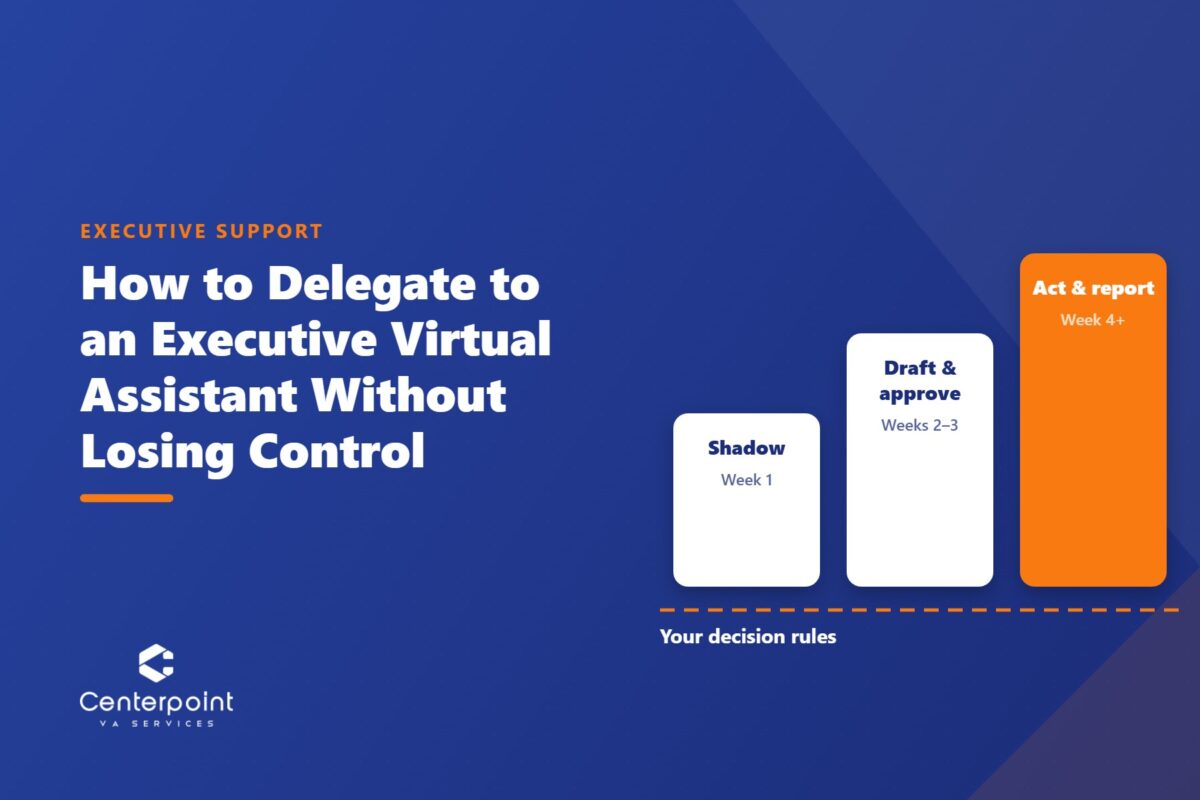
The stages below move authority over in steps. The assistant earns each step by showing judgment in the previous one, and you can see that judgment before it reaches a client.
Stage 1: Shadow (first week)
The assistant reads, sorts and drafts, but sends nothing. They label the inbox, propose calendar changes, and write replies that sit in drafts for you to approve or edit. Your edits are the training material: every change you make tells them how you think.
Stage 2: Draft and approve (weeks two and three)
Routine items now go out without you: confirmations, rescheduling inside agreed rules, standard replies from approved templates. Anything new or sensitive still comes to you as a draft. The assistant keeps a running list of the judgment calls they made so you can scan it, not reconstruct it.
Stage 3: Act and report (week four onward)
The assistant handles the four blocks on their own and reports at a fixed time each day. You stop approving and start reviewing. The line between “theirs” and “yours” is now written down, which is what lets you step back without guessing what is happening in your own inbox.
Write the decision rules before you hand over access
The single most useful document in the handoff is a one-page set of decision rules. It replaces the question “would they want this?” with an answer the assistant can look up. A workable first version covers:
- Who gets a same-day reply and who can wait until the daily summary.
- Who can book time directly, and which hours are protected for focused work.
- How to answer a meeting request from someone you do not know, including the polite decline wording.
- Travel preferences: airlines, seat, hotel standard, and the latest acceptable arrival time.
- What always comes to you: pricing, hiring, legal commitments, and anything that speaks for you personally to a client or partner.
This is the same principle behind SOPs and process documentation anywhere else in a business: the rule lives on paper, not in one person’s memory.
How to keep control without micromanaging
Once the assistant is acting on their own, three habits keep you informed without pulling you back into the work.
A daily summary at a fixed time. One message: what was handled, what is waiting on you, and what changed on the calendar.
A short weekly review. Fifteen minutes to go through the judgment calls from the week. Correct the ones you would have made differently, then add the correction to the decision rules so it does not come up again.
Scoped access, not shared passwords. Use delegate access on email and calendar and a password manager for everything else. You keep a full record of what was sent and booked, and access can be adjusted or removed in minutes. Control here is technical, not just a matter of trust.
What to delegate first, and what to keep
Start with the calendar. It is the most rule-based of the four blocks, mistakes are easy to spot, and the time saved shows up in the first week. Move to the inbox next, then travel, then meeting prep and follow-through, which needs the most context about your clients and priorities.
Some things stay with you no matter how long the engagement runs: commercial terms, personnel decisions, and anything that commits you to a position. An assistant who flags these rather than guessing is doing the job well. If you want to compare the setup with a broader team, our guide to building a lean, scalable VA team covers how the same principles apply across more than one assistant.
Frequently asked questions
How do I delegate to an executive virtual assistant without losing control?
Hand over authority in stages rather than all at once: a first week where the assistant only drafts, two weeks where routine items go out without approval, then full ownership with a fixed daily report. Write decision rules before granting access, review judgment calls weekly, and use delegate access instead of shared passwords.
What should I delegate to an executive virtual assistant first?
Start with calendar management. It is the most rule-based of the core executive support tasks, errors are easy to see, and it frees time quickly. Inbox triage usually follows, then travel booking, then meeting preparation and follow-through.
How long does it take to fully hand off executive support?
With a staged handoff, most of the routine work can move to the assistant within about a month: one week of shadowing, two weeks of drafting with approval on new or sensitive items, and independent work from the fourth week. Complex client context takes longer and builds through the weekly reviews.
Is it safe to give an executive virtual assistant access to my email?
It is safer with the right setup. Use delegate access rather than sharing your password, store other logins in a password manager, keep a written list of what the assistant must escalate, and review the sent folder during the weekly check-in. Access can then be changed or removed at any time.
Next step
Centerpoint VA Services places trained, Philippines-based assistants with US businesses and supports the handoff described above. You can see how the role is structured on our executive virtual assistant services page, or talk it through directly.